MultiRowコントロールでは、独自のカスタムCSSファイルを作成し、それをアプリケーションに追加することができます。多くのアプリケーションでは、各レコードやグループがどこで始まりどこで終わるかを示しておくのが普通です。MultiRowコントロールは、グループごとに最初と最後の行/列にあるセル要素にCSSクラス名を追加することで、これを可能にしています。使用するクラス名は、wj-record-start、wj-record-end、wj-group-start、wj-group-endです。これらの組み込みクラス名をCSSルールで使用して、レコード区切りやグループ区切りの外観をカスタマイズできます。
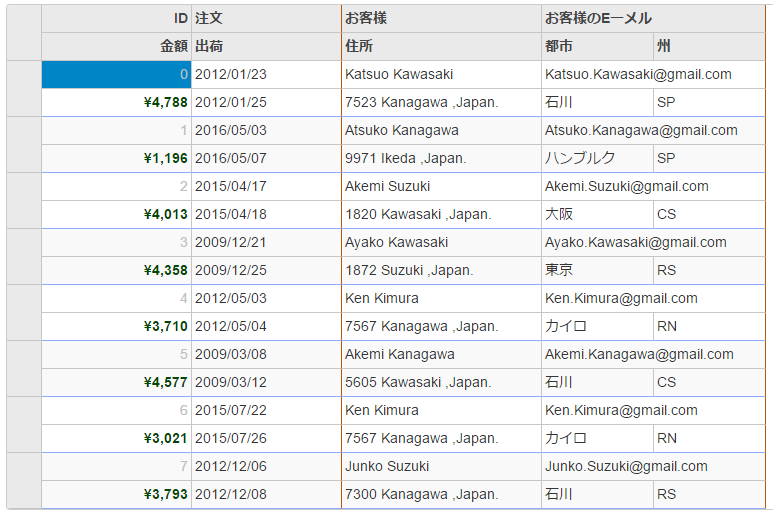
次の例は、これらのクラス名をCSSルールで使用して、レコード区切りとグループ区切りの外観をカスタマイズする方法を示します。また、標準のCssClassプロパティを使用して、グループ内の特定のセルをカスタマイズする方法も示します。
次の図は、CSSクラス名とCssClassプロパティを使用した後のMultiRowを示します。この例では、「クイックスタート」トピックで作成したサンプルを使用しています。
CustomMultiRow.cssの追加
新しいASP.NET MVCアプリケーションを作成します。アプリケーションを作成し、アプリケーションにビューを追加すると、ソリューションエクスプローラーに[コンテンツ]フォルダが作成されます。アプリケーションにカスタムスタイルシートを追加するには、次の手順に従います。
- ソリューションエクスプローラーで、[コンテンツ]フォルダを右クリックします。
- コンテキストメニューから、[追加]→[スタイルシート]を選択します。[項目の名前を指定]ダイアログが表示されます。
- スタイルシートの名前を設定します(例:
CustomMultiRow.css)。 - [OK]をクリックして、CustomMultiRow.cssスタイルシートをアプリケーションに追加します。
-
CustomMultiRow.cssファイルのデフォルトのコードを次のコードに置き換えます。
CustomMultiRow.css コードのコピー/* MultiRowのカスタムスタイル設定 */ .multirow-css .wj-cell.wj-record-end:not(.wj-header) { border-bottom-color: #8fabff; /* blue lines between records */ } .multirow-css .wj-cell.wj-group-end { border-right-color: #bc5505; /* brown lines between groups */ } .multirow-css .wj-cell.id { color: #c0c0c0; } .multirow-css .wj-cell.amount { color: #014701; font-weight: bold; } .multirow-css .wj-cell.email { color: #0010c0; text-decoration: underline; } @@font-face { font-family: 'Fira'; src: url("../fonts/fira/FiraSans-Regular.ttf"); font-weight: normal; font-style: normal; } @@font-face { font-family: 'Fira'; src: url("../fonts/fira/FiraSans-Bold.ttf"); font-weight: bold; font-style: normal; } .custom-multi-row .wj-cell { font-family: Fira; }
コードの場合
Styling.cshtml
| Razor |
コードのコピー
|
|---|---|
@using MultiRowNetCore.Models
@model IEnumerable<Orders.Order>

@section Styles{
    <link rel="stylesheet" href="~/Content/CustomMultiRow.css" />
}

<c1-multi-row id="stylingMultiRow" class="multirow multirow-css">
    <c1-items-source source-collection="Model" disable-server-read="true"></c1-items-source>
       <c1-multi-row-cell-group header="注文" colspan="2">
        <c1-multi-row-cell binding="Id" header="ID" width="150" class="id" />
        <c1-multi-row-cell binding="Date" header="注文" width="150" />
        <c1-multi-row-cell binding="Amount" header="金額" format="c" class="amount" />
        <c1-multi-row-cell binding="ShippedDate" header="出荷" />
    </c1-multi-row-cell-group>
    <c1-multi-row-cell-group header="お客様" colspan="3">
        <c1-multi-row-cell binding="Customer.Name" name="お客様" header="Cutomer" width="200" />
        <c1-multi-row-cell binding="Customer.Email" name="CustomerEmail" header="お客様のEメール" class="email" colspan="2" />
        <c1-multi-row-cell binding="Customer.Address" name="CustomerAddress" header="住所" />
        <c1-multi-row-cell binding="Customer.City" name="CustomerCity" header="都市">
        </c1-multi-row-cell>
        <c1-multi-row-cell binding="Customer.State" name="CustomerState" header="州" />
    </c1-multi-row-cell-group>
</c1-multi-row>
|
|