DataFilter supports conditional filtering operations which allow users to apply filters based on logical conditions. This makes it easier to match and view records that fit a specified condition when working with a large dataset. Furthermore, you can also narrow down your search by combining two conditions by using AND/OR operators. DataFilter supports different types of filters like text filters, date filters, and numeric filters depending on the type of data stored in the columns.
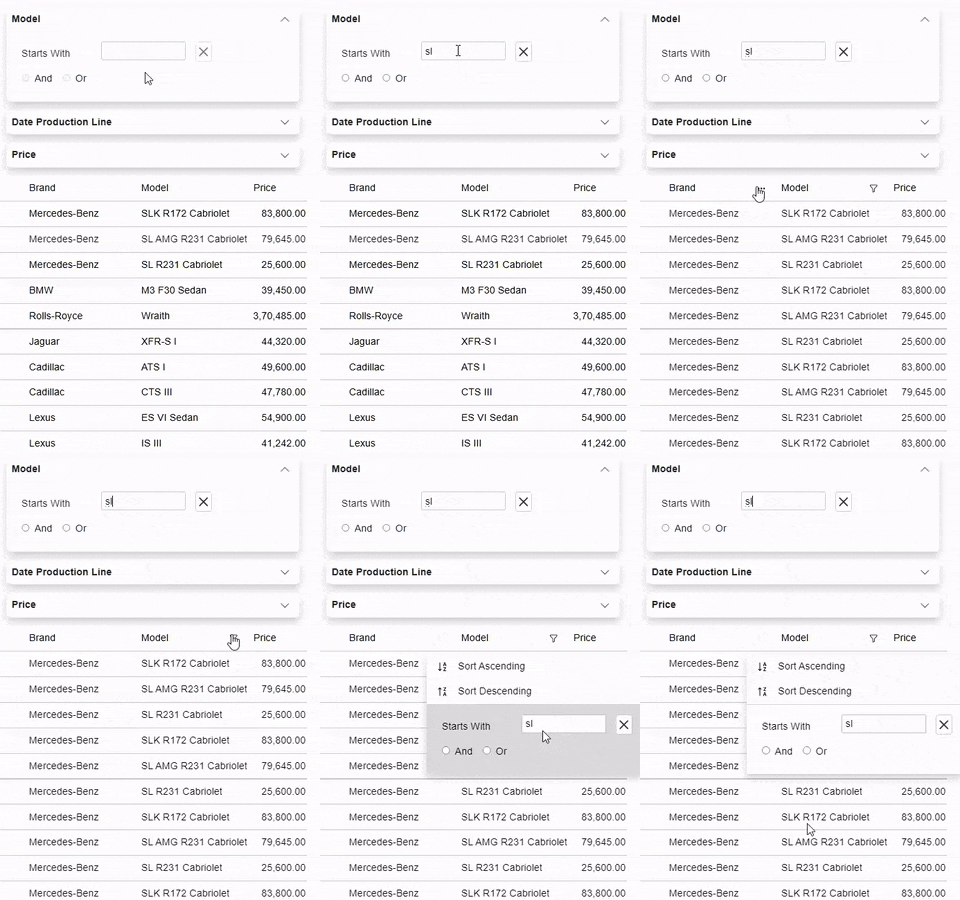
The following table describes the types of conditional filters supported by DataFilter:
| Filter Type | Description |
|---|---|
| Number Filters | |
| Equals | Filters values equal to the condition. |
| Does Not Equal | Filters values not equal to the condition |
| Greater Than | Filters values greater than the condition. |
| Greater Than Or Equal To | Filters values greater than or equal to the condition. |
| Less Than | Filters values which are less than the condition. |
| Less Than Or Equal To | Filters values which are less than or equal to the condition. |
| Text Filters | |
| Equal text | Filters values equal to the condition. |
| Does Not Equal Text | Filters values not equal to the condition. |
| Begins With | Filters values that begin with the specified characters. |
| Ends With | Filters values that end with the specified characters. |
| Contains | Filters values that contain the specified characters. |
| Date Filters | |
| Equals | Filters values equal to the condition. |
| Does Not Equal | Filters values not equal to the condition. |
| Greater Than | Filters values greater than the condition. |
| Greater Than Or Equal To | Filters values greater than or equal to the condition. |
| Less Than | Filters values which are less than the condition. |
| Less Than Or Equal To | Filters values which are less than or equal to the condition. |
DataFilter provides TextFilter, NumericFilter, and DateFilter classes which can be used to implement conditional filtering based on the data type of columns. These classes provide various properties to customize conditional filtering operations for specified data column. Let’s say you want to apply numeric type conditional filtering to filter your dataset by price. To do so, first, you need to disable the automatically generated filters by setting AutoGenerateFilters property of the C1DataFilter class to false. Then, you can use the NumericFilter class, and specify the name of the data item on which the filter gets applied by using the PropertyName property. Additionally, you can also set the header text of the filter by using the HeaderText property.
The following code example shows the implementation of different types of conditional filtering by using TextFilter, NumericFilter, and DateFilter classes. This example uses cars.cs class available in the DataFilterExplorer product sample.
| Index.Razor |
コードのコピー
|
|---|---|
@page "/ConditionalFilters" @using Localization @using C1.Blazor.DataFilter @using C1.Blazor.Grid @using C1.Blazor.Accordion <div class="filtersSection"> <C1DataFilter @ref="_dataFilter" AutoGenerateFilters="false" AutoApply="_autoApply.GetValueOrDefault()" ItemsSource="@_data" ExpandMode="@ExpandMode.One"> <DataFilters> <TextFilter PropertyName="Model" /> <DateFilter PropertyName="DateProductionLine" HeaderText="Date Production Line" /> <NumericFilter PropertyName="Price" Increment="1000" Format="F2" /> </DataFilters> </C1DataFilter> </div> <div class="dataSection"> <FlexGrid AutoGeneratingColumn="OnAutoGeneratingColumn" ItemsSource="@_data" HeadersVisibility="GridHeadersVisibility.All" Style="@("max-height: inherit")"> </FlexGrid> </div> @code{ bool? _autoApply = true; C1DataFilter _dataFilter; C1.DataCollection.C1DataCollection<Car> _data; protected override void OnInitialized() { var carsTable = DataProvider.GetCarTable(); _data = new C1.DataCollection.C1DataCollection<Car>(DataProvider.GetCarDataCollection(carsTable)); } void OnAutoGeneratingColumn(object sender, GridAutoGeneratingColumnEventArgs args) { if (args.Property.Name == nameof(Car.Picture)) { args.Column.CellTemplate = target => builder => { builder.OpenElement(0, "img"); builder.AddAttribute(1, "style", "max-height: 35px"); builder.AddAttribute(2, "src", $"data:image/bmp;base64, {((Lazy<string>)target).Value}"); builder.CloseElement(); }; } } void OnApplyFilterClicked() { _ = _dataFilter.ApplyFilterAsync(); } } |
|