Input provides various properties for customizing the appearance and styling the Input control, so that you can generate the TextBox control as per your requirement and change the look and feel of the application you are creating.
Appearance
With the appearance-related properties, you can change the fore-color, and add background image and layout to a TextBox.
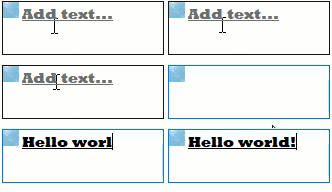
The code snippet below depicts how to enhance the appearance of the TexTbox control.
| C# |
コードのコピー
|
|---|---|
//TextBoxの外観に関連するプロパティを変更します c1TextBox1.Font = new System.Drawing.Font("Rockwell Extra Bold", 11F, System.Drawing.FontStyle.Underline, System.Drawing.GraphicsUnit.Point); c1TextBox1.ForeColor = System.Drawing.Color.RoyalBlue; c1TextBox1.Icon = new C1.Framework.C1BitmapIcon(null, new System.Drawing.Size(16, 16), System.Drawing.Color.Transparent, Image.FromFile(@"resources\OIP (2).jpg")); c1TextBox1.Location = new System.Drawing.Point(429, 433); c1TextBox1.Placeholder = "Add text..."; c1TextBox1.Size = new System.Drawing.Size(162, 54); |
|
Styling
The C1TextBox class provides the BackColor and ForeColor properties to set the background and foreground colors, respectively. Besides these, it also provides the Styles property to apply styling to different states of textbox such as Default, Disabled, Hot, HotPressed, and Pressed.
The following image showcases styling applied to the Button control.
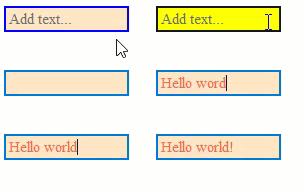
To apply styling to the TextBox control, use the following code. Here, we apply styling to the control by setting background color, foreground color, font style, and borders.
| C# |
コードのコピー
|
|---|---|
// TextBox のスタイル関連のプロパティを変更します c1TextBox1.BackColor = System.Drawing.Color.Bisque; c1TextBox1.ForeColor = System.Drawing.Color.Tomato; c1TextBox1.Font = new System.Drawing.Font("Times New Roman", 11F, System.Drawing.FontStyle.Italic, System.Drawing.GraphicsUnit.Point); c1TextBox1.Styles.Hot.BackColor = System.Drawing.Color.Yellow; //境界線のスタイルを設定します c1TextBox1.Styles.Border = new C1.Framework.Thickness(2, 2, 2, 2); c1TextBox1.Styles.Default.BorderColor = System.Drawing.Color.Blue; //ボタンのスタイルを設定します c1TextBox1.Styles.Button.Default.BackColor = System.Drawing.Color.Bisque; c1TextBox1.Styles.Button.Default.BorderColor = System.Drawing.Color.Crimson; |
|