The DateEdit control supports a number of date formats classified as follows:
-
Predefined formats: DateEdit supports short date, long date, general date, short time, long time, scientific, percent, and several other predefined formats. You can display date and time in any of these formats by setting the FormatType property, which takes its value from FormatType enumeration.
The following image shows the DateEdit control displaying date and time in Greenwich Mean Time.
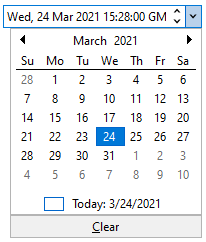
The following code snippet shows how to set the predefined formatting via code:
C# コードのコピー//データの書式 dateEdit.Value = DateTime.Now; dateEdit.FormatType = FormatType.DateAndTimeGMT; -
Custom formats: DateEdit allows custom formatting of dates. You can specify custom formats and display dates in those formats. To enable custom formatting, set the FormatType property to CustomFormat using the FormatType enumeration. Further, to display dates in custom formats, set custom format specifiers in the CustomFormat property.
For information on custom format specifiers, see Custom Date and Time Format Strings. The DateEdit control supports majority of these format strings.
The following image shows the DateEdit control displaying date in a custom format.

The following code snippet shows how to display a date in a custom format in DateEdit.
C# コードのコピー// カスタム書式として指定します dateEdit.FormatType = FormatType.CustomFormat; // カスタム書式指定子を設定します dateEdit.CustomFormat = "dddd-MM-yyyy";