The DateEdit control supports data validation of two types, pre-validation and post-validation. Pre-validation is data validation of the raw input string, while post-validation is that of the typed value entered by the user.
The following sections describe pre-validation and post-validation in DateEdit in-detail.
Pre-Validation
DateEdit allows controlling pre-validation of input string through the PreValidation property. The control provides various pre-validation options, as follows:
- Case sensitive comparisons: Allows you to make string comparisons case sensitive. To enable case sensitive comparisons, set the CaseSensitive property to true.
- Validation pattern: Allows you to specify string containing the validation pattern or rules. To specify the validation pattern, set the PatternString property. Specify multiple rules or sub-strings by using an item separator in PatternString. DateEdit supports (| by default) as the item separator for multiple strings. However, to modify the item separator, set the ItemSeparator property.
-
Validation method: Allows you to specify the method of validation. To specify validation method, set the Validation property to any of the following values from PreValidationType:
- ExactList: PatternString contains a list of possible values separated by ItemSeparator.
- PreValidatingEvent: PreValidating event is used in validation.
- Wildcards: PatternString contains a list of wildcard patterns separated by the ItemSeparator. The following characters are reserved in a pattern: ? (any single character), # (any single digit), * (zero or more characters), \ (escape). You can also define your own custom pattern characters using the pre-validation property.
- RegexPattern: PatternString contains a regular expression.
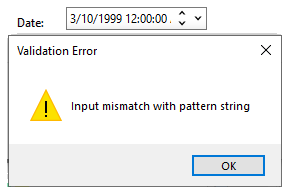
- Error message: Allows you to set the message that appears when input string does not match validation pattern. To set error message, set the ErrorMessage property.
The following image shows the DateEdit control displaying validation error message.
The following code snippet shows how to set various properties to apply pre-validation in DateEdit.
| C# |
コードのコピー
|
|---|---|
// DateEditでPreValidationを適用します dateEdit.PreValidation.CaseSensitive = true; dateEdit.PreValidation.ErrorMessage = "Input mismatch with pattern string"; dateEdit.PreValidation.ItemSeparator = "|"; dateEdit.PreValidation.PatternString = "00|11"; dateEdit.PreValidation.Validation = PreValidationType.ExactList; |
|
Post-Validation
In DateEdit, post-validation is controlled through the PostValidation property. The control provides various options for post-validation , as follows:
- Predefined values: Allows you to check whether input values match values in predefined values list or not. To specify predefined values, set the Values property.
- Excluded values: Allows you to specify values not permitted as input values. To set these values, set the ValuesExcluded property.
- Intervals: Allows you to check if input values belong to a specific interval. DateEdit supports even multiple intervals that you can specify by using the Intervals property.
- Validation method: Allows you to specify the method of validation. Set the Validation property to ValuesAndIntervals or PostValidatingEvent for declarative and programmatic validation, respectively.
The following code snippet shows how to set various properties to apply post-validation in DateEdit.