DateEdit lets you display a text in the control when nothing is selected or displayed in it. For this purpose, you can add a placeholder text to the DateEditor control using PlaceholderText property of the C1DropDownEditorBase class.
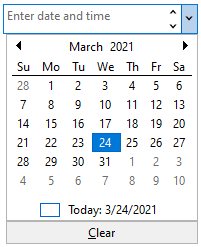
You can set the Placeholder property via the Properties window at design time, but you can also set it programmatically.
The following code shows the usage of the Placeholder property to add a text in the DateEdit control:
| XAML |
コードのコピー
|
|---|---|
// プレースホルダーテキストを追加します dateEdit.Placeholder = "Enter date and time"; |
|