DateEdit supports built-in globalization to use it in different languages and cultures in the following ways:
- Culture settings: DateEdit enables formatting, parsing, and validating data on the basis of a specific culture. The control allows specifying culture(s) through the CultureInfo class of the System.Globalization namespace. To specify a culture for DateEdit, set the CultureInfo property. This property takes integer value, and utilizes LCID property of CultureInfo class.
For information about different culture names and identifiers, see CultureInfo class in .NET Framework documentation. - Right-to-left support: DateEdit provides right-to-left support for languages that follow right-to-left scripts. To enable right-to-left functionality in the DateEdit control, set the RightToLeft property.
The following image shows DateEdit with Arabic culture in right-to-left direction.
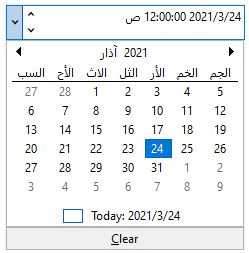
The following code snippet shows how to set the current culture and enable right-to-left functionality in the DateEdit control.
| C# |
コードのコピー
|
|---|---|
// 文化を設定します dateEdit.CultureInfo = new System.Globalization.CultureInfo("ar-IQ"); // 右から左への機能を有効にします dateEdit.RightToLeft = RightToLeft.Yes; dateEdit.Calendar.DayNameLength = 4; |
|
You can also set the DateEdit with Japanese culture:
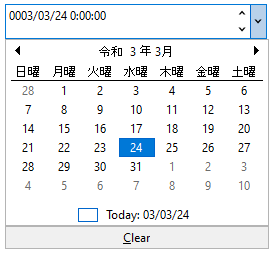
The following code snippet shows how to set the Japanese culture in the DateEdit control:
| C# |
コードのコピー
|
|---|---|
dateEdit.CultureInfo = new System.Globalization.CultureInfo("ja-JP"); dateEdit.Calendar.CalendarType = C1.Win.Calendar.CalendarType.JapaneseCalendar; dateEdit.Calendar.CaptionFormat = "gg yyyy年 MM"; |
|