MermaidJS graph parsing in FlexDiagram enables creating and rendering diagrams using MermaidJS syntax, a widely used text-based diagramming language. This feature allows importing MermaidJS text definitions, quickly prototyping diagrams, or converting existing text-based diagrams into FlexDiagram visuals.
FlexDiagram supports basic MermaidJS flowchart features. Advanced MermaidJS features may not be supported.
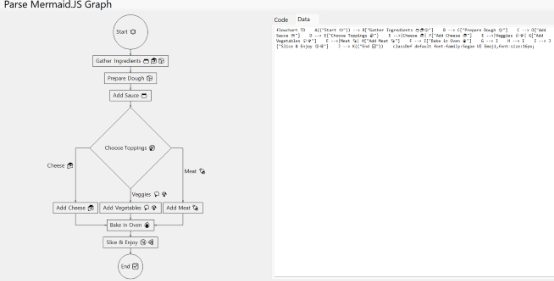
Create MermaidJS FlexDiagram
-
Create a text file or string that contains MermaidJS flowchart syntax.
Text File コードのコピーflowchart TD A(("Start 🍽️")) --> B["Gather Ingredients 🍅🧀🍞"] B --> C["Prepare Dough 🍞"] C --> D["Add Sauce 🍅"] D --> E{"Choose Toppings 🤔"} E -->|Cheese 🧀| F["Add Cheese 🧀"] E -->|Veggies 🥦🍄| G["Add Vegetables 🥦🍄"] E -->|Meat 🍖| H["Add Meat 🍖"] F --> I["Bake in Oven 🔥"] G --> I H --> I I --> J["Slice & Enjoy 😋🍕"] J --> K(("End ✅")) classDef default font-family:Segoe UI Emoji,font-size:16px;
-
Call the LoadMermaidGraph() method with the MermaidJS text and add the following code, ensuring that the C1.Diagram.Parser namespace is referenced.
C# コードのコピー// Read text from the file var text = File.ReadAllText(@"Resources\pizza.txt"); // Load Mermaid.js graph to the diagram // https://mermaid.js.org/syntax/flowchart.html diagram.LoadMermaidGraph(text);
MermaidJS content can also be loaded from a string variable instead of a file
Text File コードのコピーstring mermaidText = @" flowchart LR A[Start] --> B[Process] B --> C[End] "; diagram.LoadMermaidGraph(mermaidText);
MermaidJS FlexDiagram Sample
| C# |
コードのコピー
|
|---|---|
using C1.Diagram.Parser; // Required for LoadMermaidGraph using C1.Win.Diagram; namespace FlexDiagramPoC { public partial class Form1 : Form { public Form1() { InitializeComponent(); InitializeDiagram(); } private void InitializeDiagram() { // Create FlexDiagram instance var diagram = new FlexDiagram(); diagram.Dock = DockStyle.Fill; Controls.Add(diagram); // Read text from the file var text = File.ReadAllText(@"Resources\pizza.txt"); // Load Mermaid.js graph to the diagram // https://mermaid.js.org/syntax/flowchart.html diagram.LoadMermaidGraph(text); } } } |
|