An unbound diagram in FlexDiagram is created programmatically without data binding. You can define and add each node and edge along with their properties and relationships. This method enables full control over layout and appearance, making it suitable for simple static diagrams or custom flowcharts with precise configurations.
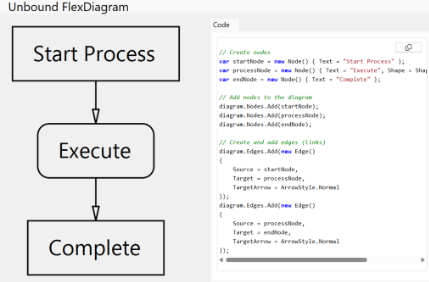
Create Unbound FlexDiagram
-
Create individual nodes and set their properties.
C# コードのコピーvar startNode = new Node() { Text = "Start Process" }; var processNode = new Node() { Text = "Execute", Shape = Shape.RoundedRectangle }; var endNode = new Node() { Text = "Complete" };
-
Add the nodes to the diagram.
C# コードのコピーdiagram.Nodes.Add(startNode); diagram.Nodes.Add(processNode); diagram.Nodes.Add(endNode);
-
Create edges to define the connections between nodes.
C# コードのコピーdiagram.Edges.Add(new Edge() { Source = startNode, Target = processNode, TargetArrow = ArrowStyle.Normal }); -
Set the layout direction (optional).
C# コードのコピー// Set the direction of the diagram diagram.Direction = DiagramDirection.TopBottom; // or LeftRight, RightLeft, BottomTopData-Bound Diagrams (Hierarchical Data)
Unbound FlexDiagram Sample
| C# |
コードのコピー
|
|---|---|
using C1.Chart; using C1.Diagram; using C1.Diagram.Parser; using C1.Win.Diagram; namespace FlexDiagramPoC { public partial class Form1 : Form { public Form1() { InitializeComponent(); InitializeDiagram(); } private void InitializeDiagram() { // Create FlexDiagram instance var diagram = new FlexDiagram(); diagram.Dock = DockStyle.Fill; this.Controls.Add(diagram); diagram.Direction = DiagramDirection.TopBottom; // Create nodes var startNode = new Node() { Text = "Start Process" }; var processNode = new Node() { Text = "Execute", Shape = Shape.RoundedRectangle }; var endNode = new Node() { Text = "Complete" }; // Add nodes to the diagram diagram.Nodes.Add(startNode); diagram.Nodes.Add(processNode); diagram.Nodes.Add(endNode); // Create and add edges (links) diagram.Edges.Add(new Edge() { Source = startNode, Target = processNode, TargetArrow = ArrowStyle.Normal }); diagram.Edges.Add(new Edge() { Source = processNode, Target = endNode, TargetArrow = ArrowStyle.Normal }); } } } |
|