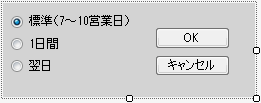
下のドロップダウンフォームには、ユーザーが C1DropDownControl から選択を行うためのオプションボタンとボタンコントロールが含まれています。
ドロップダウンフォームの外観プロパティは、フォームが次のように表示されるように既に編集されています。
C1DropDownControl の DropDownFormClassName プロパティで、フォームのクラス名(この例では、WindowsApplication1.DropDownForm1)を選択します。プロジェクトを実行してドロップダウン矢印を選択すると、ドロップダウンフォームが表示されます。
ドロップダウンフォーム上のボタンコントロールを有効にする
- DropDownForm1 の AcceptButton プロパティと CancelButton プロパティをそれぞれ button1 と button2 に設定します。
- [OK]ボタンを選択し、DialogResult プロパティを OK に設定します。同様に、[キャンセル]ボタンを選択し、DialogResult プロパティを Cancel に設定します。
- 項目がクリックされてドロップダウンフォームが閉じるときに、コントロールテキストが変更されるようにするには、PostChanges イベントに次のイベントハンドラを追加します。
Visual Basicでコードを書く場合
Visual Basic コードのコピーPrivate Sub DropDownForm1_PostChanges(sender As Object, e As System.EventArgs) If (MyBase.DialogResult = DialogResult.OK) Then Dim control1 As Control For Each control1 In MyBase.Controls If (TypeOf control1 is RadioButton AndAlso CType(control1, RadioButton).Checked) Then MyBase.OwnerControl.Value = CType(control1, RadioButton).Text End If Next End If End SubC#でコードを書く場合
C# コードのコピーprivate void DropDownForm1_PostChanges(object sender, System.EventArgs e) { if (DialogResult == DialogResult.OK) { foreach (Control control1 in Controls) { if (control1 as RadioButton != null && ((RadioButton)control1).Checked) { OwnerControl.Value = ((RadioButton)control1).Text; } } } } - 設計時に、DropDownForm1 を選択して[プロパティ]ウィンドウにプロパティを表示し、プロパティツールバーの[イベント]ボタン
 をクリックします。
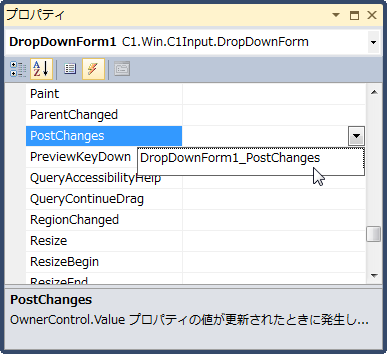
 - DropDownForm1.PostChanges イベントを DropDownForm1_PostChanges に設定します。
- フォームが開いたときに[OK]ボタン(button1)がフォーカスを受け取るようにするには、DropDownForm1.FocusControl プロパティを button1 に設定します。
- [Standard]オプションボタンをオンにするには、設計時に radiobutton1 を選択し、Checked プロパティを True に設定します。
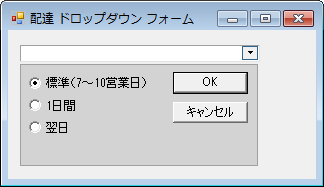
このトピックの作業結果
フォームは次のように表示されます。
関連トピック