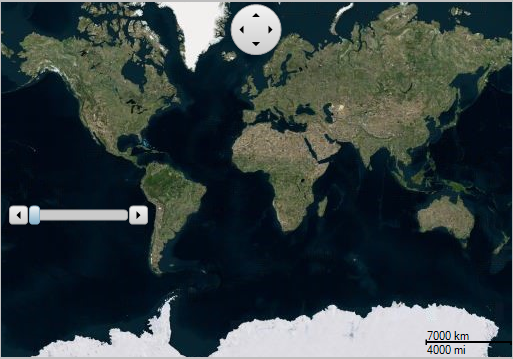
Map コントロールのツールは、マップの左側に配置されます。ただし、必要に応じて、これらの位置を変更できます。次のコードは、マップツールの位置を変更する方法を示します。
C1Map1.TileLayer.TileSource = New VirtualEarthAerialSource()
C1Map1.DistanceScale.Alignment = ContentAlignment.BottomRight
C1Map1.PanTool.Alignment = ContentAlignment.TopCenter
C1Map1.ZoomTool.Alignment = ContentAlignment.MiddleLeft
C1Map1.ZoomTool.Orientation = Orientation.Horizontal
c1Map1.TileLayer.TileSource = new VirtualEarthAerialSource();
c1Map1.DistanceScale.Alignment = ContentAlignment.BottomRight;
c1Map1.PanTool.Alignment = ContentAlignment.TopCenter;
c1Map1.ZoomTool.Alignment = ContentAlignment.MiddleLeft;
c1Map1.ZoomTool.Orientation = Orientation.Horizontal;
マップ内のツールの位置を変更すると、次の図のようになります。
C1Map では、Bounds プロパティを設定して、マップツールの位置とサイズをカスタマイズすることもできます。次のコードは、Bounds プロパティを使用して、パンツールの位置とサイズをカスタマイズする方法を示します。
C1Map1.PanTool.Bounds = New Rectangle(100, 100, 100, 100)
c1Map1.PanTool.Bounds = new Rectangle(100, 100, 100, 100);