his section demonstrates how to display data using the ListView control.
Step 1: Add the Control
Add the C1ListView control to the layout.
| XAML |
コードのコピー
|
|---|---|
<Window x:Class="ListViewExplorer.MainWindow" xmlns:c1="using:C1.WinUI.ListView" Title="ListViewExplorer"> <Grid> <c1:C1ListView x:Name="listView" Margin="50 50 0 0"></c1:C1ListView> </Grid> </Window> |
|
Step 2: Bind Data
Assign a collection to the ItemsSource property.
| CS |
コードのコピー
|
|---|---|
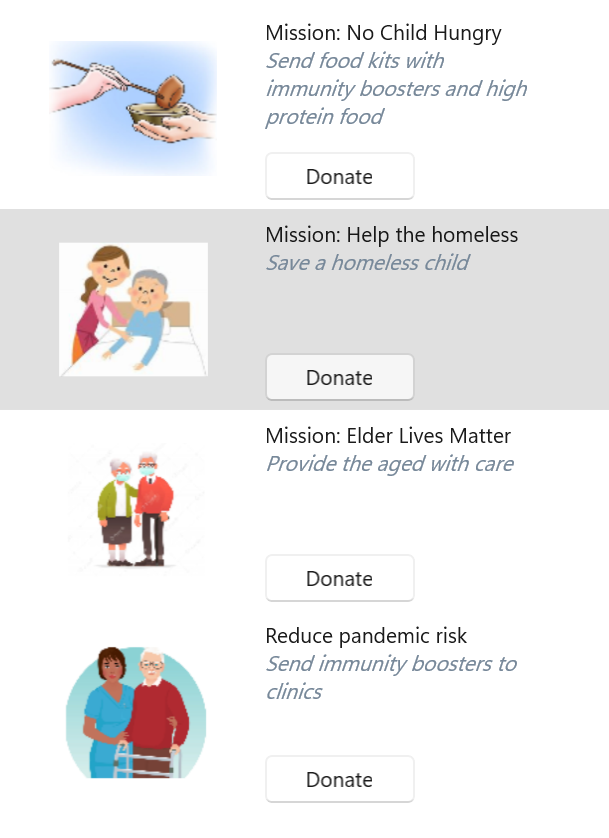
//Create list and add item to it public static List<Items> GetData() { return new List<Items> { new Items { Heading = "Mission: No Child Hungry", Description = "Send food kits with immunity boosters and high protein food", ImagePath = "Assets/image1.png" }, new Items { Heading = "Mission: Help the homeless", Description = "Save a homeless child", ImagePath = "Assets/image2.png" }, new Items { Heading = "Mission: Elder Lives Matter", Description = "Provide the aged with care", ImagePath = "Assets/image3.png" }, new Items { Heading = "Reduce pandemic risk", Description = "Send immunity boosters to clinics", ImagePath = "Assets/image4.png" } }; } //Bind the list to the control listView.ItemsSource = GetData(); |
|
Step 3: Define Item Template
Define a DataTemplate to control item layout and appearance.
| XAML |
コードのコピー
|
|---|---|
<c1:C1ListView x:Name="listView" Margin="50 50 0 0"> <c1:C1ListView.ItemTemplate> <DataTemplate> <StackPanel Orientation="Horizontal"> <Image Source="{Binding ImagePath}" Width="175" Height="90" /> <StackPanel> <TextBlock FontSize="14" TextWrapping="Wrap" Height="90" Width="175"> <Run Text="{Binding Heading}" /> <LineBreak /> <Run Text="{Binding Description}" FontStyle="Italic" Foreground="LightSlateGray"/> </TextBlock> <Button Content="Donate" Width="100"/> </StackPanel> </StackPanel> </DataTemplate> </c1:C1ListView.ItemTemplate> </c1:C1ListView> |
|
Step 4: Run the Application
The application displays a list of items using the defined template.