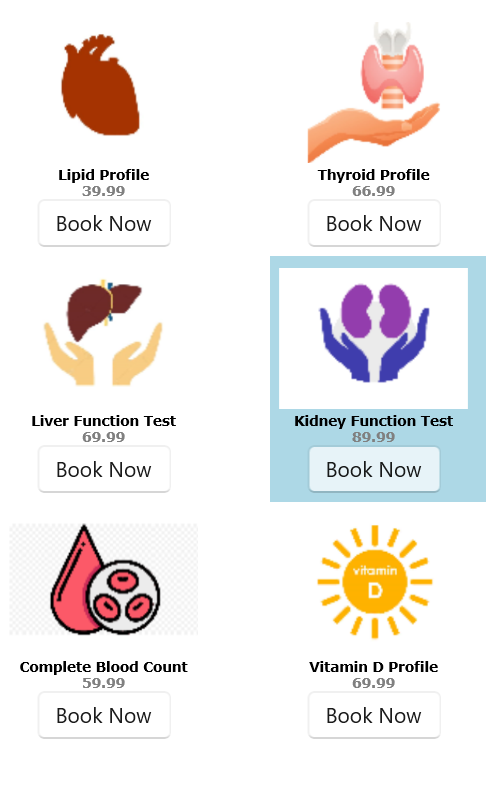
The C1TileListView control displays items in a tile-based layout.
| XAML |
コードのコピー
|
|---|---|
<Grid>
    <Grid.Resources>
        <DataTemplate x:Key="HealthCheckTemplate">
            <StackPanel Orientation="Vertical">
                <Image Source="{Binding Image}" Height="98" Width="126" />
                <TextBlock TextWrapping="Wrap" FontFamily="Verdana" FontWeight="Bold" TextAlignment="Center">
                    <Run Text="{Binding Caption}" Foreground="Black" FontSize="9"/>
                    <LineBreak />
                    <Run Text="{Binding Amount}" FontSize="9" Foreground="Gray"/>
                </TextBlock>
                <Button Content="Book Now" HorizontalAlignment="Center"/>
            </StackPanel>
        </DataTemplate>
    </Grid.Resources>
    <c1:C1TileListView  x:Name="tilesListView"  Background="White"  ShowSelectAll="True"  SelectionMode="Extended"  SelectedBackground="LightBlue"  ItemTemplate="{StaticResource HealthCheckTemplate}"  ItemHeight="164"  ItemWidth="180" />
</Grid>
|
|
| C# |
コードのコピー
|
|---|---|
public MainWindow() { InitializeComponent(); tilesListView.ItemsSource = HealthData(); } public static List<HealthCheck> HealthData() { return new List<HealthCheck> { new HealthCheck { Image = "Assets/heart.png", Caption = "Lipid Profile", Amount = 39.99 }, new HealthCheck { Image = "Assets/thyroid.png", Caption = "Thyroid Profile", Amount = 66.99 }, new HealthCheck { Image = "Assets/liver.png", Caption = "Liver Function Test", Amount = 69.99 }, new HealthCheck { Image = "Assets/kidney.png", Caption = "Kidney Function Test", Amount = 89.99 }, new HealthCheck { Image = "Assets/blood.png", Caption = "Complete Blood Count", Amount = 59.99 }, new HealthCheck { Image = "Assets/vitamin.png", Caption = "Vitamin D Profile", Amount = 69.99 } }; } |
|