このセクションでは、移植可能アプリまたは共有アプリに Sunburst チャートコントロールを追加し、そこにデータを追加する方法について説明します。C# または XAML で Xamarin コンポーネントを追加する方法の詳細については、「C# による Xamarin コンポーネントの追加」または「XAML による Xamarin コンポーネントの追加」を参照してください。
このトピックは 3 つの手順で構成されます。
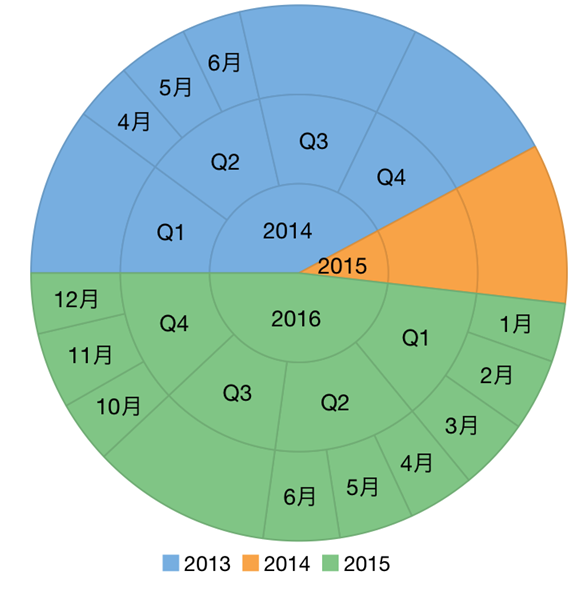
次の図は、上記の手順を実行した後の Sunburst チャートを示しています。
手順 1:Sunburst チャート用データソースの作成
次のクラスは、Sunburst チャートコントロールのデータソースとして機能します。
| C# |
コードのコピー
|
|---|---|
    public class DataService
    {
        Random rnd = new Random();
        static DataService _default;

        public static DataService Instance
        {
            get
            {
                if (_default == null)
                {
                    _default = new DataService();
                }

                return _default;
            }
        }

        public static List<SunburstDataItem> CreateHierarchicalData()
        {
            Random rnd = Instance.rnd;

            List<string> years = new List<string>();
            List<List<string>> times = new List<List<string>>()
            {
                new List<string>() { "1月", "2月", "3月"},
                new List<string>() { "4月", "5月", "6月"},
                new List<string>() { "7月", "8月", "9月"},
                new List<string>() { "10月", "11月", "12月" }
            };

            List<SunburstDataItem> items = new List<SunburstDataItem>();
            var yearLen = Math.Max((int)Math.Round(Math.Abs(5 - Instance.rnd.NextDouble() * 10)), 3);
            int currentYear = DateTime.Now.Year;
            for (int i = yearLen; i > 0; i--)
            {
                years.Add((currentYear - i).ToString());
            }
            var quarterAdded = false;

            foreach (string y in years)
            {
                var i = years.IndexOf(y);
                var addQuarter = Instance.rnd.NextDouble() > 0.5;
                if (!quarterAdded && i == years.Count - 1)
                {
                    addQuarter = true;
                }
                var year = new SunburstDataItem() { Year = y };
                if (addQuarter)
                {
                    quarterAdded = true;

                    foreach (List<string> q in times)
                    {
                        var addMonth = Instance.rnd.NextDouble() > 0.5;
                        int idx = times.IndexOf(q);
                        var quar = "Q" + (idx + 1);
                        var quarters = new SunburstDataItem() { Year = y, Quarter = quar };
                        if (addMonth)
                        {
                            foreach (string m in q)
                            {
                                quarters.Items.Add(new SunburstDataItem()
                                {
                                    Year = y,
                                    Quarter = quar,
                                    Month = m,
                                    Value = rnd.Next(20, 30)
                                });
                            };
                        }
                        else
                        {
                            quarters.Value = rnd.Next(80, 100);
                        }
                        year.Items.Add(quarters);
                    };
                }
                else
                {
                    year.Value = rnd.Next(80, 100);
                }
                items.Add(year);
            };

            return items;
        }

        public static List<FlatDataItem> CreateFlatData()
        {
            Random rnd = Instance.rnd;
            List<string> years = new List<string>();
            List<List<string>> times = new List<List<string>>()
            {
                new List<string>() { "1月", "2月", "3月"},
                new List<string>() { "4月", "5月", "6月"},
                new List<string>() { "7月", "8月", "9月"},
                new List<string>() { "10月", "11月", "12月" }
            };

            List<FlatDataItem> items = new List<FlatDataItem>();
            var yearLen = Math.Max((int)Math.Round(Math.Abs(5 - rnd.NextDouble() * 10)), 3);
            int currentYear = DateTime.Now.Year;
            for (int i = yearLen; i > 0; i--)
            {
                years.Add((currentYear - i).ToString());
            }
            var quarterAdded = false;
            foreach (string y in years)
            {

                var i = years.IndexOf(y);
                var addQuarter = rnd.NextDouble() > 0.5;
                if (!quarterAdded && i == years.Count - 1)
                {
                    addQuarter = true;
                }
                if (addQuarter)
                {
                    quarterAdded = true;
                    foreach (List<string> q in times)
                    {
                        var addMonth = rnd.NextDouble() > 0.5;
                        int idx = times.IndexOf(q);
                        var quar = "Q" + (idx + 1);
                        if (addMonth)
                        {
                            foreach (string m in q)
                            {
                                items.Add(new FlatDataItem()
                                {
                                    Year = y,
                                    Quarter = quar,
                                    Month = m,
                                    Value = rnd.Next(30, 40)
                                });
                            };
                        }
                        else
                        {
                            items.Add(new FlatDataItem()
                            {
                                Year = y,
                                Quarter = quar,
                                Value = rnd.Next(80, 100)
                            });
                        }
                    };
                }
                else
                {
                    items.Add(new FlatDataItem()
                    {
                        Year = y.ToString(),
                        Value = rnd.Next(80, 100)
                    });
                }
            };

            return items;
        }

        public static C1CollectionView<Item> CreateGroupCVData()
        {
            var data = new List<Item>();
            var quarters = new string[] { "Q1", "Q2", "Q3", "Q4" };
            var months = new[]
            {
                new { Name = "1月", Value = 1 },
                new { Name = "2月", Value = 2 },
                new { Name = "3月", Value = 3 },
                new { Name = "4月", Value = 4 },
                new { Name = "5月", Value = 5 },
                new { Name = "6月", Value = 6 },
                new { Name = "7月", Value = 7 },
                new { Name = "8月", Value = 8 },
                new { Name = "9月", Value = 9 },
                new { Name = "10月", Value = 10 },
                new { Name = "11月", Value = 11 },
                new { Name = "12月", Value = 12 }
            };
            var year = DateTime.Now.Year;
            int yearLen, i, len = 100;
            var years = new List<int>();
            yearLen = 3;

            for (i = yearLen; i > 0; i--)
            {
                years.Add(year - i);
            }

            int y, q, m;
            for (i = 0; i < len; i++)
            {
                y = (int)Math.Floor(Instance.rnd.NextDouble() * yearLen);
                q = (int)Math.Floor(Instance.rnd.NextDouble() * 4);
                m = (int)Math.Floor(Instance.rnd.NextDouble() * 3);

                data.Add(new Item()
                {
                    Year = years[y],
                    Quarter = quarters[q],
                    MonthName = months[q].Name,
                    MonthValue = months[q].Value,
                    Value = Math.Round(Instance.rnd.NextDouble() * 100)
                });
            }
            var cv = new C1CollectionView<Item>(data);

            //ソートは現在のCollectionViewのグループと同期できません
            SortDescription yearSortDescription = new SortDescription("Year", SortDirection.Ascending);
            SortDescription quarterSortDescription = new SortDescription("Quarter", SortDirection.Ascending);
            SortDescription monthSortDescription = new SortDescription("MonthValue", SortDirection.Ascending);
            SortDescription[] sortDescriptions = new SortDescription[] { yearSortDescription, quarterSortDescription, monthSortDescription };
            cv.SortAsync(sortDescriptions);

            GroupDescription yearGroupDescription = new GroupDescription("Year");
            GroupDescription quarterGroupDescription = new GroupDescription("Quarter");
            GroupDescription monthGroupDescription = new GroupDescription("MonthName");
            GroupDescription[] groupDescriptions = new GroupDescription[] { yearGroupDescription, quarterGroupDescription, monthGroupDescription };
            //   cv.GroupAsync(groupDescriptions);

            return cv;
        }
    }

    public class FlatDataItem
    {
        public string Year { get; set; }
        public string Quarter { get; set; }
        public string Month { get; set; }
        public double Value { get; set; }
    }
    public class SunburstDataItem
    {
        List<SunburstDataItem> _items;

        public string Year { get; set; }
        public string Quarter { get; set; }
        public string Month { get; set; }
        public double Value { get; set; }
        public List<SunburstDataItem> Items
        {
            get
            {
                if (_items == null)
                {
                    _items = new List<SunburstDataItem>();
                }

                return _items;
            }
        }
    }

    public class Item
    {
        public int Year { get; set; }
        public string Quarter { get; set; }
        public string MonthName { get; set; }
        public int MonthValue { get; set; }
        public double Value { get; set; }
    }
|
|
手順 2:SunBurst チャートコントロールの追加
C# または XAML で Sunburst チャートコントロールを初期化するには、次の手順を実行します。
C# のコード
- Portable または Shared プロジェクトに新しいクラス(QuickStart.cs など)を追加し、次の参照を挿入します。
C# コードのコピーusing Xamarin.Forms; using C1.Xamarin.Forms.Chart;
- 新しい GetChartControl( ) メソッド内で Sunburst チャートコントロールをインスタンス化します。
C# コードのコピーpublic static C1Sunburst GetChartControl() { C1.Xamarin.Forms.Chart.C1Sunburst c1Sunburst = new C1.Xamarin.Forms.Chart.C1Sunburst(); c1Sunburst.ItemsSource = DataService.CreateFlatData(); c1Sunburst.Binding = "Value"; c1Sunburst.BindingName = "Year,Quarter,Month"; PieDataLabel pieDataLabel = new PieDataLabel(); pieDataLabel.Content = "{}{name}"; return c1Sunburst; }
XAML のコード
- Portable または Shared プロジェクトに新しいコンテンツページ(例:QuickStart.xaml)を追加し、<ContentPage> タグを変更して次の参照を追加します。
XAML コードのコピー<ContentPage xmlns="http://xamarin.com/schemas/2014/forms" xmlns:x="http://schemas.microsoft.com/winfx/2009/xaml" xmlns:c1="clr-namespace:C1.Xamarin.Forms.Chart;assembly=C1.Xamarin.Forms.Chart" x:Class="SunBurst.MainPage">
- Sunburst チャートコントロールを初期化します。それには、
<ContentPage></ContentPage>タグ間の<StackLayout></StackLayout>タグ内で、次のようにマークアップを追加します。XAML コードのコピー<Grid Margin="10"> <c1:C1Sunburst x:Name="sunburst" Binding="Value" BindingName="Year,Quarter,Month" ToolTipContent="{}{name} {y}" LegendPosition="Bottom"> <c1:C1Sunburst.DataLabel> <c1:PieDataLabel Position="Center" Content="{}{name}"> <c1:PieDataLabel.Style> <c1:ChartStyle StrokeThickness="0"/> </c1:PieDataLabel.Style> </c1:PieDataLabel> </c1:C1Sunburst.DataLabel> </c1:C1Sunburst> </Grid> </ContentPage>
- ソリューションエクスプローラーで、QuickStart.xaml ノードを展開し、QuickStart.xaml.cs を開いて、C# コードを表示します。
- QuickStart( ) クラスコンストラクタで、Sunburst チャートの ItemSource プロパティを DataService.CreateFlatData(); に設定します。
次のコードは、上の手順を実行した後の QuickStart( ) クラスコンストラクタを示します。
C# コードのコピーpublic QuickStart() { InitializeComponent(); this.sunburst.ItemsSource = DataService.CreateFlatData(); }
手順 3:プロジェクトの実行
- ソリューションエクスプローラーで、App.cs をダブルクリックして開きます。
- Sunburst チャートコントロールを表示するには、次の手順を実行します。
-
C# クラスを返すには、クラスコンストラクタ App( ) で新しい ContentPage を MainPage として設定し、GetChartControl( ) メソッドを呼び出してコントロールを ContentPage のコンテンツに割り当てます(このメソッドは前の手順「手順 2:Sunburst チャートコントロールの追加」で定義)。
次のコードは、上記の手順を実行した後のクラスコンストラクタ App
()を示します。C# コードのコピーpublic App() { // The root page of your application MainPage = new ContentPage { Content = QuickStart.GetChartControl() }; }
-
Content ページを返すには、クラスコンストラクタ
App()で、Content ページQuickStartをMainPageとして設定します。次のコードは、この手順を実行した後のクラスコンストラクタ
App()を示します。C# コードのコピーpublic App() { // The root page of your application MainPage = new QuickStart(); }
-
C# クラスを返すには、クラスコンストラクタ App( ) で新しい ContentPage を MainPage として設定し、GetChartControl( ) メソッドを呼び出してコントロールを ContentPage のコンテンツに割り当てます(このメソッドは前の手順「手順 2:Sunburst チャートコントロールの追加」で定義)。
- iOS および UWP アプリを実行するには、いくつかの追加手順が必要です。
-
iOS アプリ:
- ソリューションエクスプローラーで、YourAppName.iOS プロジェクト内の
AppDelegate.csをダブルクリックして開きます。 -
FinishedLaunching()メソッドに次のコードを追加します。C# コードのコピーC1.Xamarin.Forms.Chart.Platform.iOS.FlexChartRenderer.Init();
- ソリューションエクスプローラーで、YourAppName.iOS プロジェクト内の
-
UWP アプリ:
- ソリューションエクスプローラーで、
MainPage.xamlを展開します。 MainPage.xaml.csをダブルクリックして開きます。- 次のコードをクラスコンストラクタに追加します。
C# コードのコピーC1.Xamarin.Forms.Chart.Platform.UWP.FlexChartRenderer.Init();
-
(オプション)UWP アプリケーションを Release モードでコンパイルする場合は、App.xaml.cs の OnLaunched メソッドに次のコードを明示的に追加して、アプリケーション内に正しいアセンブリを挿入する必要があります。
C# コードのコピーvar assembliesToInclude = new List<Assembly>(); assembliesToInclude.Add(typeof(C1.Xamarin.Forms.Chart.Platform.UWP.FlexChartRenderer) .GetTypeInfo().Assembly); assembliesToInclude.Add(typeof(C1.UWP.Chart.FlexChart).GetTypeInfo().Assembly); Xamarin.Forms.Forms.Init(e, assembliesToInclude);
- ソリューションエクスプローラーで、
-
iOS アプリ:
- F5 を押してアプリケーションを実行します。