このトピックでは、Windows フォームアプリケーションで C1FontPicker を使用する方法について具体的に説明します。Visual Studio プロジェクトを設定し、実行時にアプリケーションをカスタマイズする手順を示します。
- Windows フォームプロジェクトを作成し、フォームに C1FontPicker コントロールを追加します。
- フォームに RichTextBox コントロールを追加します。RichTextBox の Text プロパティを TextFontStyle に設定します。フォームは次の図のように表示されます。
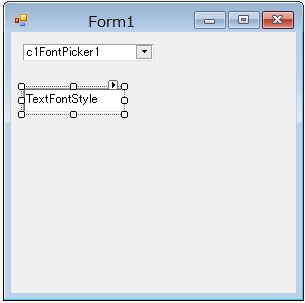
- 次のコードを C1FontPicker1_ValueChanged イベントハンドラに追加して、フォントが選択されたときにテキストのフォントを変更します。
VB コードのコピーPrivate Sub C1FontPicker1_ValueChanged(sender As Object, e As EventArgs) Handles C1FontPicker1.ValueChanged RichTextBox1.SelectionFont = New Font(DirectCast(sender, C1FontPicker).Value.ToString(), RichTextBox1.SelectionFont.Size, RichTextBox1.SelectionFont.Style) End Sub
C# コードのコピーprivate void c1FontPicker1_ValueChanged(object sender, EventArgs e) { richTextBox1.SelectionFont = new Font(((C1FontPicker)sender).Value.ToString(), richTextBox1.SelectionFont.Size, richTextBox1.SelectionFont.Style); }
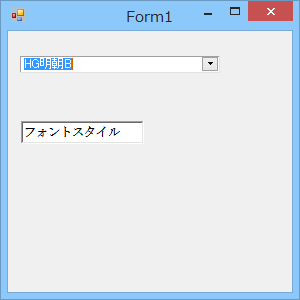
- アプリケーションを実行します。これで、C1FontPicker ドロップダウンからフォントを選択できます。次の図は、この結果を示します。
関連トピック